

One of the best ways to excel as a host is by tracking your finances on an Airbnb spreadsheet. I mean, how can you improve if you don’t know the progress of your revenue and expenses? Good bookkeeping is so crucial to your success as an Airbnb host!
In this article I will explain to you the key steps involved in creating a short term vacation spreadsheet. I will even provide you with a simple download to my free Airbnb spreadsheet template.
If you are after something more advanced you might like to check out my range of spreadsheets for sale. These will help take your Airbnb hosting and bookkeeping to a new level.
Free Spreadsheet!
How does a FREE Airbnb spreadsheet sound to you? Download your copy below:
How to Create an Airbnb Spreadsheet
First things first, when creating your Airbnb spreadsheet, you need to do a bit of planning. What metrics do you want to track? Do you want it to be simple, or detailed?
For example, a simple accounting spreadsheet only requires a list of revenue and expenses. Whereas if you want to get more detailed, you can create forecasts and interactive charts.
There are two key areas in particular that you should focus on. First is revenue, the second is expenses. Then once you have that data recorded, it is then where you can start getting creative with your metrics.

Revenues
First, setup a new tab in your Airbnb Spreadsheet calculator and call it revenues. This is where you will be tracking all your Airbnb income. Or HomeAway, or Booking.com or whatever platforms you are using.
Second, create some columns to track your data. For example, you will want to track check in and check out dates. Also it’s a good idea to track the price breakdown on your spreadsheet. By that, I mean such things as cleaning fees, service fees, payment total and so on. In addition to that, you may wish to track the total guests and their names, plus total nights.
Revenue Category Ideas:
- Check In, Check Out and Payment Dates
- Guest Name & Total Guests
- Total nights of booking
- Price Breakdown (Cleaning Fees, etc)
- Platform (eg. Airbnb, HomeAway, Booking.com)
Finally, format it so that it looks nice and is easy to read. There is nothing worse than a messy looking Airbnb spreadsheet!
Expenses
As you no doubt would have guessed, you will be tracking your Airbnb expenses in this spreadsheet. Therefore this step is a little bit trickier as the expenses will vary from host to host.
First of all you will have your setup costs. These are all the costs of setting up your Airbnb, prior to the listing going live. I like to keep these on an individual tab, keeping them separate from ongoing costs.
Second, there are your ongoing costs for the operation of your Airbnb. The big one is utility costs such as gas, electricity, water and so on. There will be property expenses such as mortgage, repairs, property taxes, etc. Use the list below for some inspiration.
Expense Category Ideas:
- Utilities (gas, electricity, water)
- Property (mortgage, repairs, taxes)
- Supplies (linen, toiletries, cleaning)
- Business (accounting, software, education)
- Setup Costs (furniture, kitchenware)
- Staff (cleaners, laundry, photographer)
- Insurance

Finally, create columns on your spreadsheet so you can input your Airbnb expenses. Key columns include the date, item description, cost and category. You may wish to include the vendor or other taxes involved.
Key Metrics for Airbnb Spreadsheet
Now it’s time for you to decide on the performance metrics that you wish to track on your Airbnb spreadsheet. This is the fun bit!
Microsoft Excel is incredibly powerful with what it can do. Once you have all your revenues and expenses tracked, you’re able to manipulate the data to show you want. You’ll even be able to create beautiful graphs and charts to display data as well.
So first things first, what Airbnb metrics should you calculate on your spreadsheet?
For starters, the most important thing is your earnings. All you need to know is if you are making money or not. I mean, what else matters, right?
Below are some ideas of key metrics to track:
Key Metrics to track
- Total earnings (by month, by year, etc)
- Occupancy stats
- Expenses by category
- Expenses by room (eg. bedroom, lounge)
- Earnings by platform (eg. Airbnb, HomeAway)
- Average earnings (per night, per month, etc)
- Projected earnings for year ahead
Tracking Multiple Properties
Tracking one property on an Airbnb spreadsheet is quite simple, but what if you host multiple properties?

One great way to track multiple properties is by assigning each property to it’s own tab within the one spreadsheet.
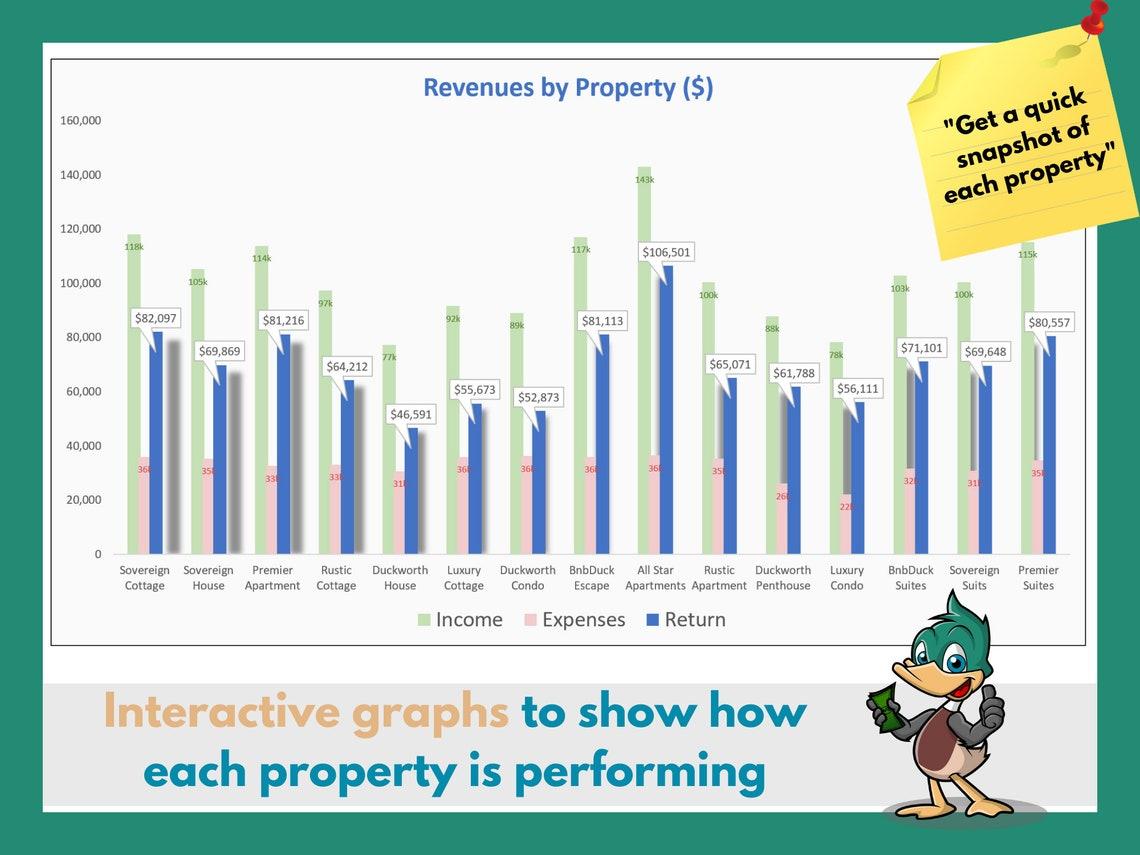
Next, you link up each of those tabs to a single Dashboard page. As a result, you will be able to compare each property side by side on the one page.
Another alternative way to track multiple properties is by assigning each property it’s own spreadsheet. In other words, just save a single property spreadsheet for each property you have. This is a cumbersome way of doing it, but it is a good option nonetheless.
I’m often asked by Airbnb hosts if I can help them with a spreadsheet for multiple properties. Therefore I have created my own line of BnbDuck spreadsheets for you guys. Just be sure you have a copy of Microsoft Excel.
I encourage you to check out the BnbDuck Multiple Property Spreadsheet below. This product gives you the ability to track up to 15 properties in total.
BnbDuck Airbnb Spreadsheets
Here at BnbDuck there is a great range of Airbnb spreadsheets. So if you don’t want to start your own from scratch, you will love mine!
There are two options. First is the Single Property Spreadsheet which is ideal for hosts with just the one property. Second is the Multiple Property Spreadsheet that allows you to track up to 15 properties in total.
#1 Single Property Spreadsheet
Easy to use spreadsheet to track all your Airbnb income and expenses. Find fully customisable lists for the categories you want to track. For example, track income from other platforms such as VRBO, Booking.com etc.
Use the interactive dashboard to track all your financials with dynamic graphs and easy to read statistics. Compare your revenue by month or year, using the Annual Statement report. There is even an option to track occupancy stats by specific months.
This spreadsheet is designed for Single Properties. If you wish to track multiple properties on in spreadsheet, see the products in section below.
Screenshots (click to enlarge)


#2 Multiple Property Spreadsheet
BnbDuck gives you the choice of three spreadsheets to track multiple Airbnb properties.
- 1 to 5 properties
- 1 to 10 properties
- 1 to 15 properties
You example, if you host 6 Airbnb properties, the 1 to 10 properties spreadsheet would suit your needs.
Firstly, these products are super easy to run and I have simple notes to guide you through. Each property has it’s own dashboard, in addition to a central dashboard.
Secondly, there are fully customisable categories for you to track. For instance, you can choose which income platforms and expense categories you wish to track. Likewise, each property has detailed metrics that you can track.
Thirdly, the dashboard contains dynamic charts and statistics for each property. Equally important is the ability to compare each property, side by side. As a result you can see which properties are performing best, and which are under performing.
Screenshots (click to enlarge)




Airbnb Spreadsheet Summary
Hopefully by now you have the building blocks in place to create a kickass Airbnb spreadsheet. I have summarised for you the key metrics that you should be tracking and given you some good ideas to get started.
If it all sounds a bit daunting then I recommend downloading the free template below. This will certainly help you get started on your journey.
On the other hand, you make like to purchase one of premium spreadsheets at the BnbDuck store.
Meanwhile if you have any questions or suggestions, please reach out in the comments section below!
Free Spreadsheet!
How does a FREE Airbnb spreadsheet sound to you? Download your copy below: